![[previous]](../icons/left.gif)
![[up]](../icons/up.gif)
![[next]](../icons/right.gif)
![[contents]](../icons/contents.gif)
DrScheme's definitions window can be used as a plain text editor to
write down step-by-step evaluations ``by hand.'' The cut and paste
functions, available from the menu or through the usual key bindings,
make it easy to copy the expression from one step as a starting point
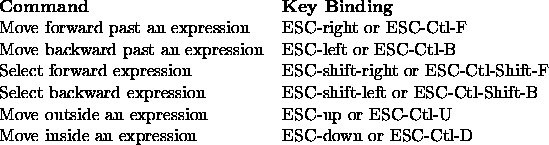
for the next step. DrScheme also provides special Scheme-specific
editing commands for manipulating expressions:
The Stepper
DrScheme also provides a tool that automates the step-by-step reductions. The Step button in DrScheme steps through the evaluation of all definitions and expressions in the definitions window. To run the stepper on an example input, it must appear in the definitions window (not the interactions window).
When you click Step, a new window appears with three parts. The top part contains definitions that are already processed. The left-hand part of the bottom shows the expression currently being evaluated, with a green highlight for the relevant subexpression. The right part shows a single step for highlighted subexpression, with the resulting value highlighted in purple.
Clicking the Next button moves the right-hand expression to the left, then shows the next step in evaluation. If the definitions window contains multiple expressions, then the stepper starts with a new expression once the previous one is completely evaluated.
If you change the program in the definitions window, yu must close the current stepper window and click Step again to step through the new program.